Hi,
as we have received many questions on charting capabilities in ReportServer, pls. note the following:
you can create graphical reports such as bar, pie charts in both pivot reports and mondrian reports. These are highly dynamic reports.
BIRT, Jasper, Excel and Crystal Reports also support charts.
You can see examples of a Saiku / BIRT / Jasper Reports in the online demo: https://reportserver.net/de/demo/
user: demoadmin
password: demoadmin
Saiku and Pivot reports are highly dynamic reports. With just a click, you can create different types of charts for the same report. As an example, check the following representations of the same report:


Pivot Report charts are analogous.
Here you can see two examples of a bar chart in a BIRT report: http://demo.raas.datenwerke.net/?locale=en#reportexec/uuid:f24c0277-6616-454f-917b-845846801178 and http://demo.raas.datenwerke.net/?locale=en#reportexec/uuid:6353c374-d43b-4e71-bf5a-cff0b2c46f52


Here an example of a pie chart in a Jasper report: http://demo.raas.datenwerke.net/?locale=en#reportexec/uuid:935406c1-4d39-4eda-ab35-0738a7bc539f

You can create even maps/ almost type of chart report with script reports:
http://demo.raas.datenwerke.net/?locale=en#reportexec/uuid:16d69439-6f56-4f8e-b1be-9eacb14f243a

Script reports also allow you to create charts easily. These are highly customizable, as you control the charting libraries directly.
We added a Highchart example (Script report) here:
https://github.com/infofabrik/reportserver-samples/tree/main/src/net/datenwerke/rs/samples/charts/highcharts/
You can find the chart here:

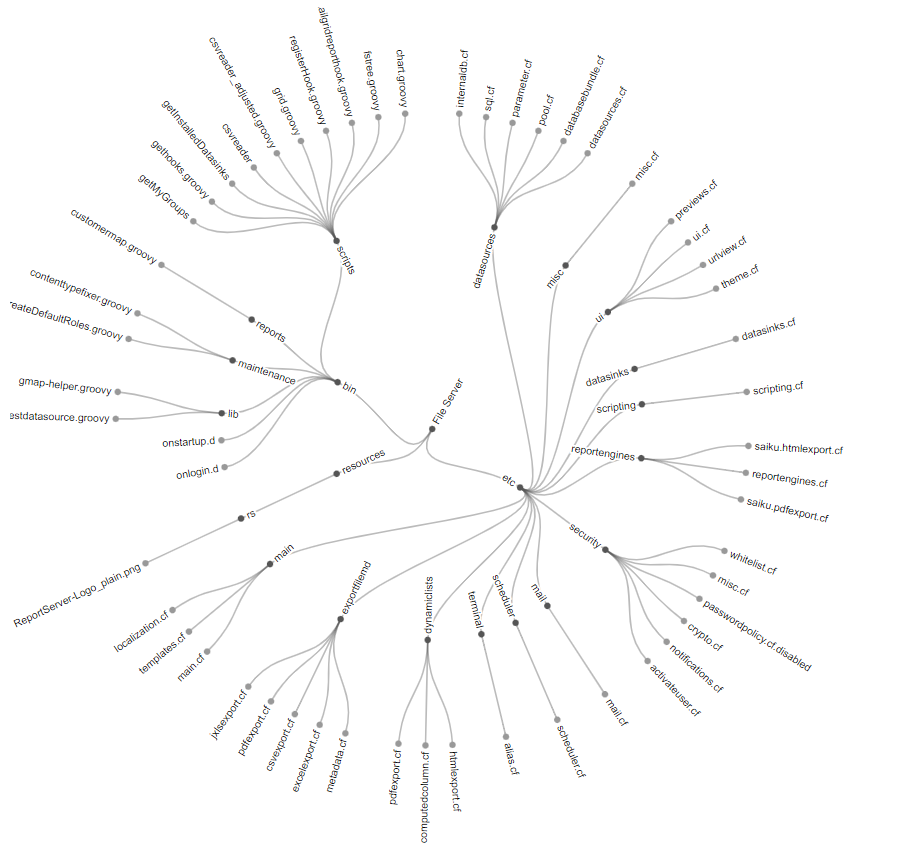
We added a D3 example (Script report) here:
https://github.com/infofabrik/reportserver-samples/tree/main/src/net/datenwerke/rs/samples/charts/radialtree/
You can find the chart here:
You can also render DOT graphs to SVG and display them in your browser as shown in the following example:
https://github.com/infofabrik/reportserver-samples/blob/main/src/net/datenwerke/rs/samples/admin/svg/scriptreport
You can find the result here:

Further, you can also use JXLS Templates to create Excel charts (JXLS Reports or JXLS Template for dynamic list). An example can be found here: https://github.com/infofabrik/reportserver-samples/tree/main/src/net/datenwerke/rs/samples/templates/jxls/jxlsreports (chart.xlsx and chart_result.xlsx). Thanks @Johann for this example:

More information on:
Jasper: https://reportserver.net/en/guides/admin/chapters/JasperReports/
BIRT: https://reportserver.net/en/guides/admin/chapters/Eclipse-Birt/
Pivot: https://reportserver.net/en/guides/user/chapters/Pivot-Mode-of-the-Dynamic-List/
Saiku / Mondrian: https://reportserver.net/en/guides/admin/chapters/Saiku—Mondrian-Reports/
Script: https://reportserver.net/en/guides/script/chapters/Script-Reporting/
Excel: https://reportserver.net/en/guides/admin/chapters/JXLS-Reports/
Your ReportServer Team